|
|
|

The sequence diagram (SD) specifies the time and control aspects of a system. Typically, you use the SD to analyze only the more complex business events. Simple business events rarely require an SD.
A collaboration diagram shows the objects and relationships involved in an interaction. It shows the messages exchanged among the objects during the interaction, numbering them to show the sequence of messages. It does not show the timing of the messages.
In most cases, a diagram's file type matches its abbreviation. This is not true for the SD, which has a file type of etd. In OMT, the SD is an event trace diagram (ETD).
Events are actions between the objects in your project. They can also transmit data.
A scenario is the sequence of events during one execution of a program. A scenario can include all the events or only the events sent to or received by certain objects in the system. An SD can contain more than one scenario. For example, you might create an SD that provides two scenarios for placing a customer order: one for an existing customer and the other for a new customer.
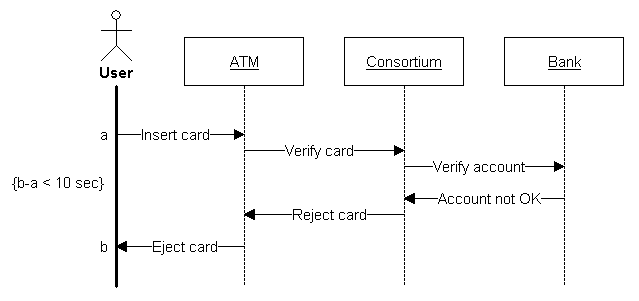
This SD shows a simple scenario for the use of an automatic teller machine. In this scenario, the system rejects the card. For the customer this transaction is simple: he inserts the card and the card is rejected. For the system, several actions are necessary. A constraint specifies 10 seconds as the maximum acceptable time interval for the transaction.
This sequence is fairly general; you can work out the Insert Card event more completely by including details such as entering the personal identification number and requesting the type of transaction. The analyst must decide what level of detail to use in the SDs.
The control panel for the sequence diagram.
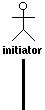
The initiator starts the sequence. Each sequence can only have one initiator, but you can draw more than one sequence in a diagram. The initiator represents an external agent, such as a user, that interacts with the system. It can be a class, but does not have to be.
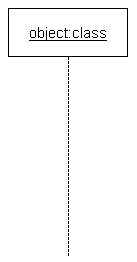
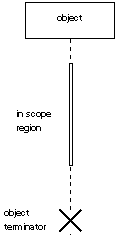
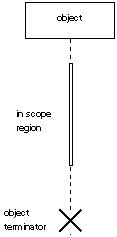
An object is an instance of a class. The object line represents a portion of the lifetime of an object in the system. Time flows from top to bottom on the symbol. The spacing between event symbols is not important. It does not indicate the length of time between events.
The type must be a class defined in a class diagram. If you omit type, the UML suite assumes the class name is the same as the object name.
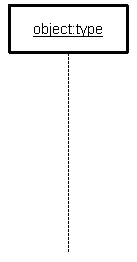
An active object, also known as a concurrent object, owns a thread of control and can initiate control activity. For example, processes and tasks are active objects.
The type of an active object does not have to be defined in a class diagram. If you omit type, the UML suite assumes type is the same as name.
The In Scope region is a white rectangle that can be placed on top of an initiator, object, or active object to show that the object is in scope. You can move the In Scope region up and down the axis of the object, but not away from it. When you move the In Scope region, nearby messages move with it. When you move messages, the In Scope region does not move. This allows you to move messages from one In Scope region to another.
The object termination symbol represents the destruction of the object.
A message represents an individual stimulus from one object to another. A message can signal an event or transmit data. It occurs at a point in time.
Multiple messages can be sent from the same point on the initiator or object line; that is, sent at the same point in time. An object can send a message to itself. Such a message must arrive at the object at another point in time.
Each message has three labels:
The Flat Message symbol is a stick arrowhead. It shows the progression to the next step in a sequence.
The Nested Message symbol is a filled solid arrowhead. It represents a procedure call or other nested flow of control. The nested sequence is completed before the outer level sequence resumes.
The Asynchronous Message symbol is a half stick arrowhead. It shows an asynchronous message between two objects.
A return message is a message that an object returns as a result of a process initiated by a message flow.
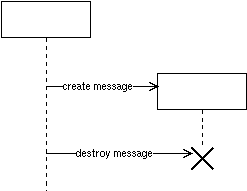
A create message is a message drawn to the name of an object.
A destroy message is a message drawn to an object terminator.
Timing constraints are text blocks used to document the time interval between two timing marks, as shown in Example SD.
Timing marks are labels at the beginning and end of each message.