|
|
|

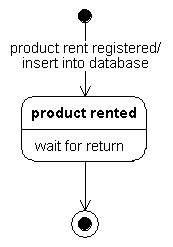
A statechart diagram (STD) describes the possible states of a single class and the events that cause state transitions. They are useful for showing the life cycle of the class.
Statechart and activity diagrams both describe state transitions and share many of the same elements. An activity diagram is most effective for describing processes that involve more than one object.
You use activities and actions to describe the response of an object to an event:
| Operation | Associated With | Purpose | timing |
|---|---|---|---|
| Activity | State | Relevant for control purposes | Sequential or continuous; takes time to complete |
| Action | Event | Not relevant for control purposes | Instantaneous |
You can define an activity further through graphical decomposition. Opening an activity leads to another STD that is the definition itself, or an AD.
An activity has a starting event, an ending event, and possibly some intermediate events. A continuous activity persists until an event terminates it by causing a transition from the state. A sequential activity terminates by itself after an interval of time.
Do not use super states to specify events or concurrency. Specify these through decomposition diagrams. Use decomposition to define activities as well. Each state in the decomposition diagram represents one step of the activity. The decomposition diagram is a one-shot diagram with input and output transitions.
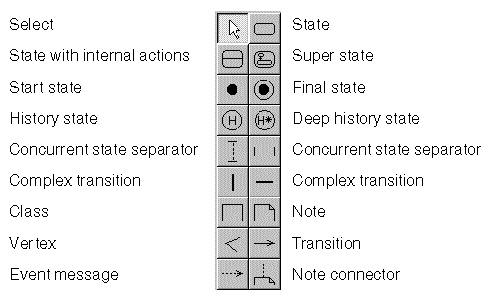
The control panel for the STD.
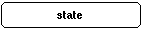
A state represents an externally observable mode of behavior that persists for a period of time. Activities can run within a state. Transformations occur between states rather than within a state. Use the State with internal actions to add activities to a state.
The initial state is the first state of behavior of an object after its creation.
The label is optional and usually not supplied.
The final state is the last state of behavior of an object before it expires or is destroyed.
state-name[(parameter[,parameter...])]
The label is optional and usually not supplied.
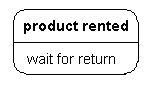
Similar to a state without internal actions, but allows you add to the lower area of the symbol the activities initiated during this state.
one or more event condition activity send-clauses
Note: Multiple send-clauses use the following syntax:
This table shows example activities.
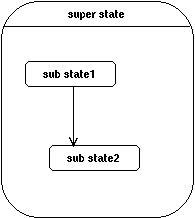
A super state generalizes parts of a diagram. From outside the diagram, you can treat the generalized part as a single state.
States and transitions inside the super state are connected to the outside via the super state only. Transition arrows can be attached to the super state from the inside and the outside. By nesting a relatively autonomous part of a diagram in a super state, you can reduce the number of transitions and make the diagram easier to read.
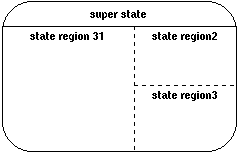
Horizontal and vertical concurrent state separators can be used to create concurrent state regions in a super state.
Each region has one label: name
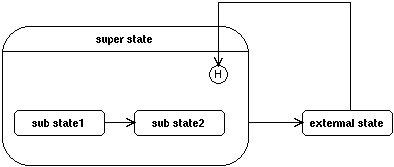
A concurrent state region can contain one history state and one deep history state. A transition to the history state indicates that the object resumes the state it last had in this state region. A history state can have multiple incoming events/actions. It can have at most one unlabeled outgoing events/actions, which identifies the state to "resume" if the transition occurs before the object has been in the state identified by the state region.
You can move a history state, but only within its concurrent state region. You cannot resize a history state.
A concurrent state region can contain one history state and one deep history state. A transition to the deep history state indicates that the object resumes the state it last had at any depth within the state region. A deep history state can have multiple incoming events/actions. It can have at most one unlabeled outgoing events/actions, which identifies the state to "resume" if the transition occurs before the object has been in the state identified by the state region.
You can move a history state, but only within its concurrent state region. You cannot resize a history state.
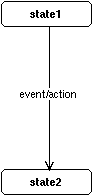
Transitions occur between two states:
An event causes (or fires) a change of state: the transition. The arrow of the transition indicates the order in which the states appear. A complete STD specifies a state sequence that is caused by an event sequence.
event condition action send-clause
Note: Multiple send-clauses use the following syntax:
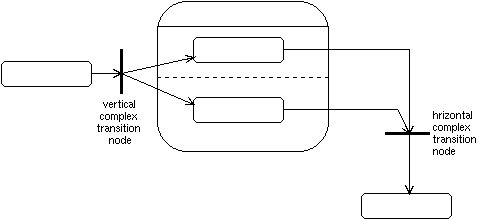
You can use complex transitions to converge and diverge transitions. Use the horizontal complex transition to converge/diverge vertical transitions. Use the vertical complex transition to converge/diverge horizontal transitions.
The label for a complex transition is the same as that for a simple transition (see Transition).
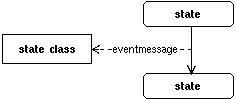
A class in an STD represents a class receiving an event. It is connected to a transition by an event message.
Classes referenced in an STD must be defined in a class diagram.
An event message sends a message to a class. In a complete model, every event message corresponds to an operation in a CD.
An event message always originates from an event and ends at a class.
event-name[(parameter[,parameter. . .])]