|
|
|

The data flow diagram (DFD) is an OMT diagram that is added to the UML suite when you activate the OMT module.
WARNING: Information specified in the DFD will be lost during future upgrades.
In OMT, you use DFDs to model what happens with data. You model the system as a network of processes that transform and exchange data.
The DFDs show the flow of data values from their sources in objects through the processes that transform them to their destination in other objects. Values can include input values, output values, and internal data stores. Control information is shown only in the form of control flows.
The following table lists the important elements of DFDs.
| Symbol | Stands For |
|---|---|
| Data process | Data processing |
| Data flow | Data flow or the exchange of data between processes |
| Data store | Data storage |
| Actor | Object producing and consuming data |
You can follow certain guidelines to draw meaningful DFDs.
To specify what a high-level process does, break it down into smaller units in more DFDs. A high-level process is an entire DFD. Each high-level process is decomposed into other processes with data flows and data stores. Each decomposition is a DFD in itself. You can continue to break down processes until you reach a level on which further decomposition seems impossible or meaningless.
The data flows of the opened process are connected in the new diagram to the process related to the opened process. Vertices, and the flows and objects connected to them, are transferred with the flows that are connected to the decomposed process.
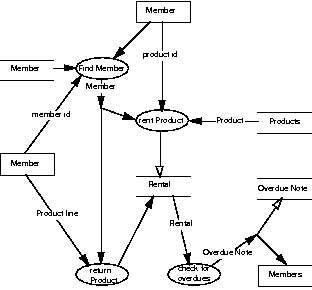
The following illustration shows a sample DFD.
This section describes the symbols used in the DFD. The following illustration shows the symbols as they appear in the diagram control panel.
Note: The Vertex, Select, Note and, Note connector symbols are common to all diagrams. They are described in Chapter 3, Working With Diagrams.
A data process transforms data values.
You can make a distinction between the following types of processes:
The name of a process is usually a description of the transformation it performs.
There are three sorts of transformation:
If you open a process, you can either create a new DFD or open an existing DFD in which the process is specified.
The data flows of the opened process are connected in the new diagram to the process with the name of the opened process. Vertices, and the flows and objects connected to them, are transferred with the flows that are connected to the decomposed process.
If a data process has a decomposition at a lower level, an asterisk is placed inside the ellipse. The data process can be opened only if it has a name.
A data store stores data passively for later access. A data store responds to requests to store and access data. It does not generate any operations. A data store allows values to be accessed in an order different from the order in which they were generated.
Input flows indicate information or operations that modify the stored data such as adding or deleting elements or changing values. Output flows indicate information retrieved from the store; this information can be an entire value or a component of a value.
An actor produces and consumes data, driving the DFD. Actors lie on the boundary of the diagram; they terminate the flow of data as sources and sinks of data. They are also known as terminators. Data flows between an actor and a diagram are inputs to and outputs of the diagram. The system interacts with people through the actor.
A DFD anchor provides a start or end point. In decomposition diagrams, anchors represent the nodes connected to the decomposed process in the higher level diagram.
A data flow moves data between processes or between processes and data stores. As such, it represents a data value at some point within a computation and an intermediate value within a computation if the flow is internal to the diagram. This value is not changed.
The names of input and output flows can indicate their roles in the computation or the type of the value they move. Data names are preferably nouns. The name of a typical piece of data, the data aspect, is written alongside the arrow.
See also Flow names and inheritance below.
A result flow is a data flow that generates an object used as the target of another operation. The value of the flow is subsequently treated as an object, usually a data store.
See also Flow names and inheritance below.
A control flow is a signal that carries out a command or indicates that something has occurred. A control flow occurs at a discrete point in time. The arrow indicates the direction of the control flow. The name of the event is written beside the arrow.
Control flows can correspond to messages in CCDs or events in STDs; however, because they duplicate information in the DFD, use them sparingly.
See also Flow names and inheritance below.
Update (or bidirectional) flows are used to indicate an update of a data store, that is, a read, change, and store operation on a data flow.
See also Flow names and inheritance below.
Flows in DFDs must be named. However, flows can inherit the names of the objects they are connected to. The table below shows the rules for inheritance of names. These rules are applied in the order shown, until nothing more can be inherited. In some situations, the flow's inherited name causes an error when a Check command is carried out. The result of the inheritance is confusing in the diagram.
A forked (converging or diverging) data flow is either a split or merging data flow, or a composite data flow. A composite data flow has one name for each branch. A composite flow can split into the original flows again. A split or a merging data flow has only one name.
The name of the flow is taken as type name if no data type is specified.