|
|
|

The class communication diagram (CCD) is not a standard OMT diagram. It is the UML suite diagram used to support OMT. This diagram is added to the UML suite when you activate the OMT module.
WARNING: Information specified in the CCD will be lost during future upgrades.
You use CCDs to focus on the interaction and communication between classes and to identify the boundaries of the system. The diagrams show the communication between classes or groups of classes.
In a CCD, the communication patterns between classes are modeled by grouping the classes into subjects. The patterns between the individual classes of the subject are modeled in separate diagrams. You can use the CCD to generalize a number of communication sequences. CCDs are the class-level equivalent of SDs. They are similar to the event flow diagrams in the OMT book.
When drawing a CCD, the following points are of interest:
The structure of the messages that make up the communication is not of interest.
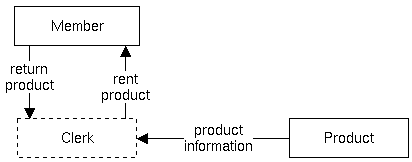
The following figure shows a simple CCD. A member of a video store communicates with a clerk to rent and return products.
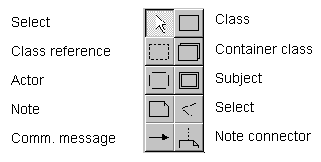
This section describes the symbols used in the CCD. The following illustration shows the symbols as they appear in the diagram control panel.
Note: The Vertex, Select, Note, and Note connector symbols are common to all diagrams. They are described in Chapter 3, Working With Diagrams.
A class is a group of objects with similar properties (attributes), common behavior (operations), common relationships to other objects, and common semantics. Classes are arranged into hierarchies. They share common structure and behavior and are associated with other classes. You can distinguish abstract classes from concrete classes. An abstract class has no direct instances, but its descendant classes do.
Objects in a class have the same attributes and behavior patterns. Most objects distinguish themselves through differences in their attribute values and relationships to other objects.
To specify the internal communication of a class, actor, or subject, you break down that component into smaller units in a CCD. You can continue this process of breaking down classes, actors, or subjects until you reach a level on which further decomposition seems impossible or meaningless.
To decompose an actor, class, or subject, open one of these diagram components. The editor window clears and loads a new CCD that contains at least the opened component. You can now draw a CCD for the opened component.
A class reference represents any class that exists in another CCD, whether in the same system or a different one.
A container class implements general purpose data structures. It refers to a possible actual implementation of the class. The container class refers to the organization or structure of the data so that algorithms can use it. These data structures are generally part of the library that comes with an object-oriented programming language. A general purpose data structure is an instance of a container class. Possible data structures are sets, bags, dynamic arrays, lists, queues, stacks, dictionaries, associations, and trees. Container classes serve as a framework for organizing collections of other objects.
An actor is a system boundary. It represents the interaction of the system with individuals or with another system. The actor is a kind of initiator. This initiator indicates that information or some other kind of response is required from the system.
A subject is a group of classes that belong to the same CAD. So, a subject in a CCD represents a CAD. It can also represent a separate system. For large projects, it is useful to define all the subjects as separate packages.
When you open a subject with scope phase, you can create a new package. If you choose to do so, a new empty CCD is also created in the new package. The name of the new package is the name of the opened subject.
A communication message is a connector between classes, subjects, and actors. It calls the operations that the classes contain, but does not represent the actions themselves. It tells a class to do what it was designed to do.