|
|
|

The message generalization diagram (MGD) is an OMT diagram that is added to the UML suite when you activate the OMT module.
WARNING: Information specified in the MGD will be lost during future upgrades.
A communication message in a CCD or a communication association in a UCD can represent more than one message. You use the MGD to define the messages that make up the communication message or communication association. The MGD focuses on a hierarchical breakdown of a complex message in the CCD or UCD.
A message that represents a number of messages is a generalized message. In the MGD, the generalized message appears at the top of the hierarchy. Messages at the bottom of the hierarchy represent the specific messages.
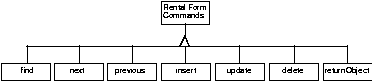
In the following figure the set of messages that are generated as a result of choosing an option on a form are grouped into the general message RentalFormCommands. The hierarchy in this example has two levels; you can create hierarchies with as many levels as necessary.
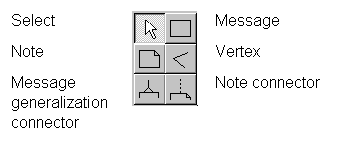
This section describes the symbols used in the MGD. The following illustration shows the symbols as they appear in the diagram control panel.
Note: The Vertex, Select, Note and, Note connector symbols are common to all diagrams. They are described in Chapter 3, Working With Diagrams.
A Message Definition describes a message or part of a composite message. Each message definition can be a combination of other messages. Such messages are indicated by more message definition symbols and the message generalization connector that joins them to the top message definition.
You can define the message definition in a separate MGD by using File | Open.
A Message Generalization Connector establishes the relationship that messages and parts of messages have with each other. The message definition, drawn on top, acts as top message. Its constituent messages or parts of the message are placed underneath.