|
|
|

An activity diagram (AD) describes processes that involve more than one object. They are useful for showing workflow and parallel processing.
Statechart and activity diagrams both describe state transitions and share many of the same elements. A statechart diagram is useful for describing the behavior of a single object across several use cases.
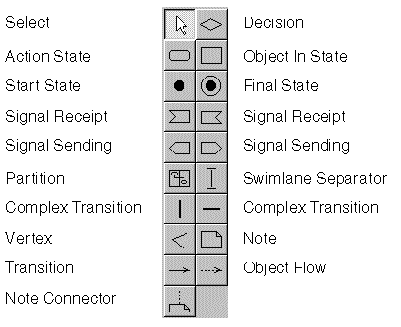
The control panel of the activity diagram.
An action state represents an activity. If necessary, you can use another activity diagram to provide details about the activity; that is, you can use activity diagrams to decompose action states.
An action state corresponds to an STDs state with internal actions when the state with internal actions has at least one outgoing transition that occurs when the internal action completes.
activity [(parameter[,parameter...])]
The start state begins the sequence of activities. It is the same as the initial state in an STD.
The final state ends the sequence of activities. It is the same as the final state in an STD.
name[(parameter[,parameter...])]
Transitions (solid arrows) order the sequence of activities. Completing an activity fires the outgoing transitions of the action state representing the activity.
An action state must have at least one outgoing transition. If an action state has more than one outgoing transition, each must have a guard condition.
A complex transition (a thick line) synchronizes activities. The AD shown previously (see Example activity diagram) includes a number of complex transitions:
Same as for a Transition.
You can use a decision diamond to express nested decisions. In the AD shown previously (see Example activity diagram), the two outgoing transitions of the Choose Dinner activity reflect a decision about whether to eat in. The [do not eat in] transition leads to a second decision, represented by the decision diamond, about whether to eat out.
An object in state represents instances of a specified object in a specified state. You must specify the object name. The state name is optional; if specified, the UML suite automatically encloses it in square brackets. Folding an object hides its state name.
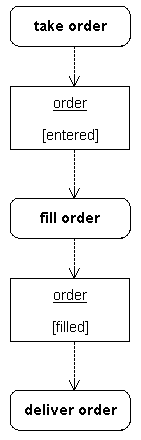
You use object flows (dashed arrows) to show how objects in state are used by action states and transitions. If an action state generates an object in state that is used by the subsequent action state, you can omit the transition (solid arrow) between the two states.
In this example, completing the Take Order activity, creates an Order in the [entered] state. The Fill Order activity requires an Order in the [entered] state and creates an Order in the [filled] state.
A signal sending symbol shows a transition sending a signal. Do not label transitions connected to a signal sending symbol. Optionally, use an object flow to indicate the object that receives the signal.
A signal receipt symbol shows a transition receiving a signal. Do not label transitions connected to a signal receipt symbol. Optionally, use an object flow to indicate the object that sends the signal.
In this example, the transition from Take Order to Fill Order sends an enterOrder signal to the Order object. The transition from Fill Order to Deliver Order receives an orderFilled signal from the Order object.
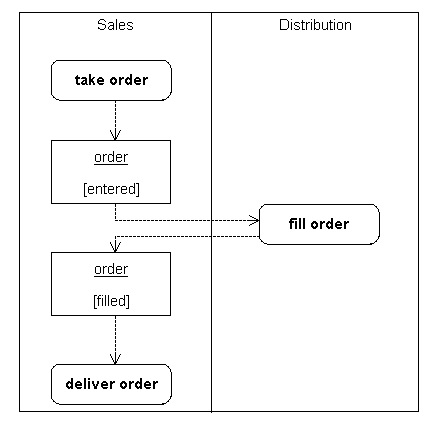
You use partitions to group the states of an activity model. Typically, each partition corresponds to an organizational unit in a business model. You can use partitions to allocate characteristics or resources among the states of an activity model.
You use swimlane separators to divide a partition into horizontal or vertical zones called swimlanes. A partition with no swimlane separators contains one swimlane.
You label each swimlane with the name of the class or department responsible for the activity states in the swimlane.
To create the two swimlanes, use a partition and a horizontal or vertical swimlane separator.