
Showing Property Values
Property values in diagram display
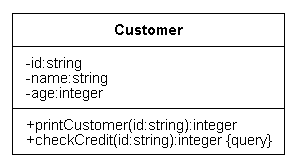
Many of the properties available in the CD and COD can be displayed as part of the diagram, as well as in the Edit Properties window. For example, the string {query} following an operation name indicates that the operation's Is Query property is set.
Purpose
Editing Property Values describes how you can use the Edit Properties window to edit property values. If you display property values as part of the diagram, you can also edit the property values by editing the text of the diagram.
How to control the display of properties
ÿ To control whether properties are displayed in the diagram, use the Show... properties of the diagram items, the Show... properties of the diagram, and the Options | Show command in the diagram editor.
Example
For example, to control the display of the Is Query operation property, use the Show Query Operations class property, the Show Query Operations CAD property, and the Options | Show | Query Operations command.
Properties controlled by each Show... property/command
If you cannot tell from the name of the Show... property/command which property's display it controls, see the descriptions of the Show... properties in List of Available Properties.
Evaluation order
The UML suite evaluates the settings of the Show... properties and commands in this order.
- The value of the Show... property of the diagram item:
- If Yes, the UML suite displays the property for this diagram item.
- If No, the UML suite does not display the property for this diagram item.
- If Default (default), the UML suite examines the Show... property of the diagram.
- The value of the Show... property of the diagram:
- If Yes, the UML suite displays the property for all diagram items.
- If No, the UML suite does not display the property for any diagram items.
- If Default (default), the UML suite examines the Options | Show command.
- The setting of the Options | Show command:
- If selected (default), the UML suite displays the property for all diagram items.
- If not selected, the UML suite does not display the property for any diagram items.
  
|
Copyright © 2000, Telelogic AB. All rights
reserved.
